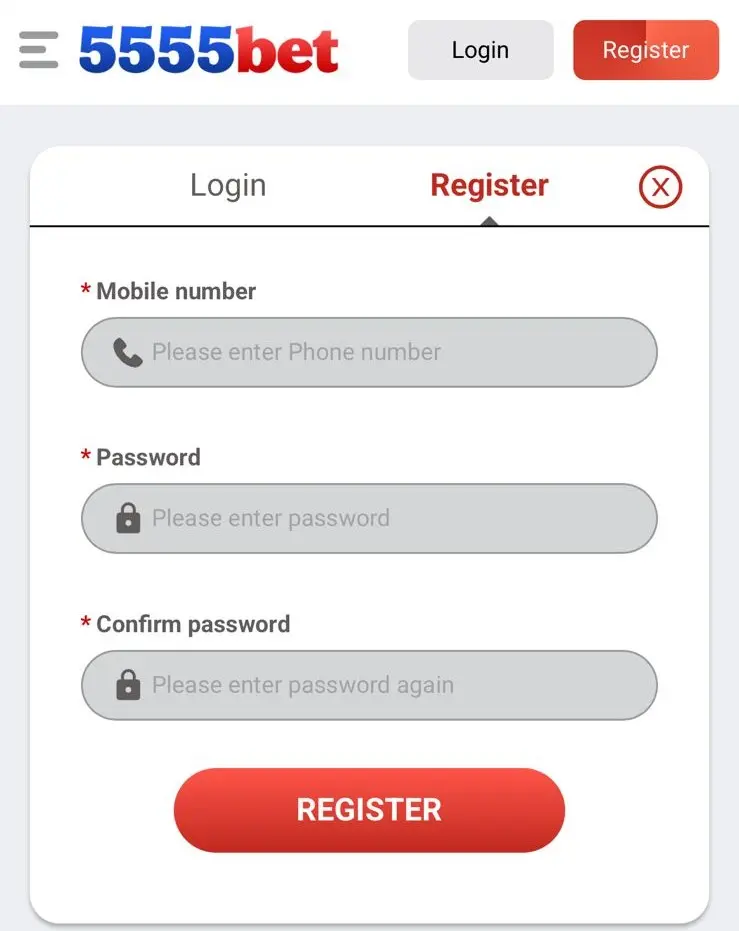
5555Bet Register — Create Your New Account
This page covers everything a new user needs to create a 5555Bet account — what to prepare before signing up, the full registration steps, how to enter a referral code, what to check after your account is created, and answers to the most common questions new users ask.
Register NowTable of Contents
- What You Need Before Registering
- How to Register on 5555Bet
- How to Enter a Referral Code
- What Happens After Registration
- Account Eligibility and Rules
- Password Rules on the Signup Form
- Registration Problems and Solutions
- Your First Steps Inside the App
- Signup Testing Notes
- Final Note
- Frequently Asked Questions
What You Need Before Registering
Registration on 5555Bet takes under two minutes when you have the right things ready. Preparing before you open the form saves you from stopping halfway through.
An active Pakistani mobile number. Your mobile number is your account identifier on 5555Bet. It must be active and able to receive SMS messages because the platform sends a one-time verification code to it during signup. The number cannot be shared across two different accounts — each account requires its own unique number.
A password you will remember. You create your password during registration. It must be at least eight characters and should include a mix of letters and numbers. Do not use your name, date of birth, or a simple sequence like "12345678." Write it down somewhere safe before you start the form — you will use this password every time you log in.
The 5555Bet app already installed on your phone. Registration happens inside the app, not through a desktop browser. If you have not yet installed the app, visit the 5555Bet download page first, complete the installation, and then return here to follow the registration steps below.
A stable internet connection. Mobile data or Wi-Fi both work. A stable connection ensures the OTP verification code arrives without delay and the form submits correctly on the first attempt.
How to Register on 5555Bet
Follow these steps exactly as written. Each step moves you to the next screen inside the app.
| Step | What to Do |
|---|---|
| 1 | Open the 5555Bet app on your phone. |
| 2 | On the opening screen, tap Register. Do not tap Login — that is for existing accounts only. |
| 3 | The registration form opens. Enter your mobile number in the first field. Use the same format every time — if you enter 03XXXXXXXXX here, always use that format when logging in later. |
| 4 | In the password field, create a password with at least eight characters using a mix of letters and numbers. |
| 5 | Enter the same password again in the Confirm Password field. Both fields must match exactly before you can proceed. |
| 6 | If you have a referral code from an existing 5555Bet user, enter it in the referral field now. See the referral code section below for details. If you do not have a code, leave this field empty. |
| 7 | Read the Terms and Conditions. Tap the checkbox to confirm you accept them. |
| 8 | Tap Submit or Register to send your details. |
| 9 | A verification screen appears. An OTP code has been sent to the mobile number you entered. Check your SMS inbox. |
| 10 | Enter the OTP code in the verification field. OTP codes are usually four or six digits. Type carefully — they expire after a short time. |
| 11 | Tap Verify to confirm your number and complete the registration. |
| 12 | Your account is now created. The app takes you directly to the main dashboard. |
How to Enter a Referral Code
A referral code is a short code given to you by an existing 5555Bet user. Entering it during registration links your new account to theirs and may unlock benefits for both of you under the platform's invite and earn program.
The referral code field appears on the registration form between the confirm password field and the Terms and Conditions checkbox. It is optional — if you do not have a code, skip the field and continue registering normally. Leaving it empty does not affect your account in any other way.
Important: The referral code can only be entered during registration. It cannot be added to your account after the signup process is complete. If someone gave you a code, enter it at step 6 above before submitting your form.
If you entered the wrong code or misspelled it, contact 5555Bet support immediately after registering before making any deposits, as corrections after account activity may not be possible.
What Happens After Registration
Once your OTP is verified, your account is active immediately. Understanding what happens next helps you start your first session without confusion.
You Are Taken to the Dashboard
The main dashboard opens straight after a successful registration. This is your central hub — it shows your wallet balance (starting at zero), the game section, your profile, and any active promotions. Take a moment to look around before doing anything else.
Your Welcome Bonus May Be Available
New accounts on 5555Bet may be eligible for a welcome bonus. This can appear as a claimable offer on the dashboard or bonus section shortly after registration. Check the bonus area of the app to see what is currently available for new users.
For a complete breakdown of all bonus types — welcome bonus, daily login bonus, cashback, leaderboard rewards and more — visit the 5555Bet homepage. Bonus details and conditions are covered there in full.
Your First Deposit Activates Your Account for Play
A new account starts with a zero balance. To play any real money game on 5555Bet, you need to make a deposit first. Go to the wallet section, tap Deposit, select your preferred payment method, and enter the amount. The minimum deposit amount is shown on the deposit screen.
Cashing out works differently from depositing and has its own limits, verification rules and processing times — those are covered step by step in our 5555Bet withdrawal guide. If you have not installed the app yet, start with the 5555Bet APK download and install guide.
Your First Login After This Session
After registering, your session stays active until you close the app or it times out. The next time you open the app, you will see the login screen. Use the mobile number and password you just created to sign in. For the complete login guide including password reset steps, visit the 5555Bet login page.
Account Eligibility and Rules
Before completing registration, confirm that you meet the basic account requirements for 5555Bet.
One account per person. Each user is permitted to hold one account only. Creating multiple accounts using different mobile numbers is against the platform rules and may result in all associated accounts being suspended. If you already have an account and cannot access it, use the 5555Bet login page to recover it rather than registering again.
One account per mobile number. Each mobile number can only be linked to one 5555Bet account. If a number has already been registered, the system will not allow it to be used again. Use a different active number if your first choice is already taken.
Valid and active mobile number required. The number must be able to receive SMS messages at the time of registration. Numbers that cannot receive OTPs cannot complete verification and therefore cannot be used to create an account.
Real information only. Use accurate details during registration. Account information linked to real payment methods must match across the platform. Inconsistencies between account details and payment details can delay or block withdrawals.
Password Rules on the Signup Form
The password you type into the registration form has to satisfy the form itself before it will submit. These are the constraints we hit while creating test accounts:
Minimum eight characters. Shorter entries are rejected inline and the Register button stays disabled until the field is long enough.
Letters and numbers together. The form accepts a letters-only password, but a mixed one such as "Ahmad2026" is what we would enter — the signup screen itself shows a strength hint as you type.
The confirm field must match exactly, capitals included. This is the single most common reason a signup form refuses to submit. Type both fields manually rather than pasting; a pasted value often carries a trailing space that the field keeps but does not display.
The password cannot be recovered later, only reset. There is no "show my password" screen inside the app. Write it down before you submit the form. If you do lose it, the reset runs through an SMS OTP — that flow, along with how to pick a password that survives long term and how to keep the account secure afterwards, is covered in the 5555Bet login and account security guide.
Registration Problems and Solutions
Most registration failures are caused by one of the issues below. Work through the relevant one before contacting support.
Mobile Number Already Registered
If the form says your mobile number is already in use, an account linked to that number already exists. Do not register again with a different number — that creates a second account you cannot merge later. Instead, go to the login page and use the Forgot Password option to recover access to the existing account. That account already holds your number and any previous activity.
OTP Not Arriving
This is the most common issue during registration. Wait a full 60 seconds before assuming it has not arrived — delivery can be delayed by network load. If it still has not come, tap Resend OTP on the verification screen. Make sure your phone has a mobile signal and SMS reception is not blocked by your carrier. Also confirm you entered your mobile number correctly in the registration form — a single digit error sends the OTP to the wrong number.
Password and Confirm Password Do Not Match
The two password fields must contain the exact same characters, including the same capitalisation. Check both fields carefully. Some Android keyboards auto-capitalise the first character — if one field was auto-capitalised and the other was not, the fields will not match even if they look the same. Type both passwords manually with auto-capitalisation turned off for accuracy.
Form Not Submitting After Tapping Register
This usually means one of the required fields is incomplete or the Terms and Conditions checkbox has not been ticked. Scroll back through the form and check every field. The checkbox must be ticked before the form will submit. If everything looks complete and the form still will not submit, check your internet connection and try again.
OTP Expired Before Entry
OTP codes have a short validity window — typically three to five minutes. If you took too long to check your SMS or enter the code, it will be expired by the time you submit it. Tap Resend OTP to generate a fresh code and enter it quickly this time.
App Closes During Registration
If the app closes or crashes during the form, open it again and tap Register. Start the form from the beginning. If your mobile number was already partially submitted, the OTP screen may appear again — tap Resend OTP to get a fresh code. If the form returns blank, fill it in again from step one.
Your First Steps Inside the App
After registration is complete, these are the three most useful things to do before starting your first session.
Check the Bonus Section
Open the bonus or promotions area of the app and look for any welcome offers available to your new account. Conditions vary — some bonuses require a first deposit, others are claimable immediately. Read the terms attached to each offer before claiming.
Set Up Your Wallet
Go to the wallet section and confirm your preferred payment method. 5555Bet supports JazzCash, EasyPaisa, and bank transfers for Pakistani users. Make your first deposit when you are ready to play. Do not deposit more than you are comfortable using as entertainment — set a clear amount and stick to it.
Explore Before Playing
Spend a few minutes navigating the app before placing any bets. Look at the game categories, check the dashboard layout, and find the account settings. Getting familiar with where things are prevents confusion during your first real session.
For a full guide to everything available inside 5555Bet — game types, bonus programs, payment options, and platform features — visit the 5555Bet homepage.
Signup Testing Notes
These are Mast Ali's own notes from creating and re-creating test accounts on 5555Bet during April and May 2026, including the attempts that failed. Nothing here is an anonymous quote.
The OTP took about 40 seconds to arrive
I registered in about two minutes. The only part that slowed me down was the OTP — I thought it wasn't coming but it arrived about 40 seconds after I submitted. Once I put the code in, my account opened straight away. The dashboard was easy to understand right from the start.
The confirm-password field rejected a capitalisation mismatch
I made the mistake of entering my password wrong in the confirm field and the form wouldn't let me move forward. I didn't realise both fields had to be exactly the same including capitals. Once I typed both manually with the same letters it went through without any problem.
A referral code cannot be added after signup
A friend gave me a referral code before I registered. I almost forgot to enter it and nearly tapped register without it. Good thing I noticed the referral field before submitting. I entered the code, finished the registration, and the welcome bonus showed up on my dashboard shortly after.
Final Note
Creating a 5555Bet account is a straightforward process when your mobile number is active and your internet connection is stable. The most important things to get right are your password — write it down before submitting — and the OTP entry, which needs to be done quickly before it expires.
Remember that each mobile number can only be registered once. If you have ever used 5555Bet before, check the login page before creating a new account — your original account may still be accessible through the password reset option.
After registration, your account is permanent and linked to your mobile number. Take the time to explore the platform before your first deposit and set a clear budget for your sessions.
To understand everything 5555Bet offers before you start playing — including all game types, bonuses, and how the payment system works — read the full platform guide on the 5555Bet homepage.
Frequently Asked Questions
Is registration free?
Yes, creating an account on 5555Bet Game is completely free. No payment is required to sign up.
How long does it take to sign up?
The registration process usually takes only a few minutes from start to finish.
Can I use my mobile phone to register?
Yes, the 5555Bet app is built for Android devices and works smoothly for both registration and gameplay.
Is my information secure?
Yes, 5555Bet Game uses advanced security systems and modern encryption to protect all user data, personal information, and transactions.
Are there bonuses for new users?
New users may receive welcome offers or promotional rewards after completing registration on the 5555Bet Game platform.
How can I contact support?
You can reach 5555Bet Game support through live chat, email, or the contact form available on the platform around the clock.